
How do I set up charging for hotel guests or customers: payment, rates and AFIR?
For each charge point, you choose who may charge and which kWh rate applies. At your request, WIM switches on charge cards from other providers and payment via the QR code, at no extra cost within WIM Management. Guests pay with their charge card or by card. WIM settles the sessions, and AFIR applies to publicly accessible charge points.
-
1. Scan the sticker
Use your phone camera. No app or account needed.
-
2. Choose and pay
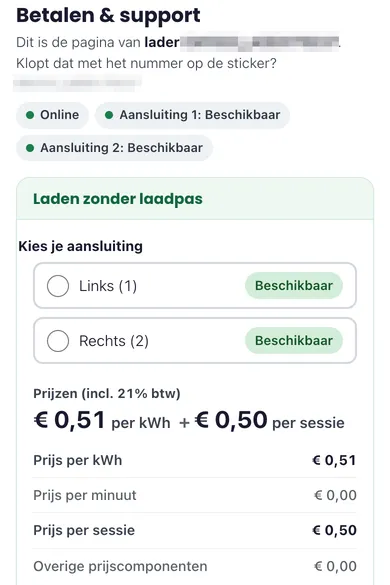
If the charge point is open to visitors, you can pay without a charge card, by credit card, Apple Pay or Google Pay. With an accepted charge card, you start charging at the charger.
Step 2 shows the real page of a charger at the Crailo charging hub: the price per kWh the driver pays, plus a €0.50 start fee per session when paying by card. Step 1 is an example screen.
How does charging work for your guests or customers?
Below are some examples on your own premises. The payment options described apply to charge points that WIM has opened at your request.
Hotel or restaurant
Guests charge during their stay or while they have dinner, for example at a hotel with six charge points for guests. They use their charge card, or pay without one via the QR sticker, at the rate you choose.
Sports club
Members and visitors charge during training or a match. At the charge points you open, they pay with their charge card or via the QR code, and you receive the revenue through your credit note.
Showroom or car dealership
Customers charge while they visit your showroom or dealership. You choose the kWh rate and WIM settles the sessions, both for charging with a charge card and for paying by card via the QR code.
Office with visitor parking
Visitors charge in the visitor car park during their appointment. You can open those charge points to charge cards and QR payment, and keep others for your employees only.
What rate do your guests pay?
You choose the rate per kWh for each charge point, and WIM sets it up for you. To change it later, send us the new amount, the charge points concerned and the start date. Read how to set the kWh rate.
For charging with a charge card from another provider and for QR payments, 5 ct per kWh is added on top of your rate. The driver sees a single kWh price that includes it. For QR payments, there is also a start fee of €0.50 per session, incl. VAT. The driver pays the 5 ct and the start fee; neither is deducted from your revenue.
How does a guest pay without a charge card?
Guests with a charge card use it as usual. A guest without one scans the QR sticker on the charge point and pays by credit card, Apple Pay or Google Pay, with no app or account needed. The price is shown on the payment page in advance. The payment is linked to the charging session, and the final amount is based on the kWh actually charged.
The full payment steps are in Let visitors pay without a charge card. That article also helps if you want to know what the guest sees on the payment page.
Does AFIR apply on your own premises?
If guests, customers or visitors charge at your site, the charge point usually counts as publicly accessible, even on your own premises. AFIR then requires, among other things, charging without a subscription, secure payment and the price shown in advance. For charge points below 50 kW, a QR code linking to a secure payment page meets this; from 50 kW, stricter payment requirements apply, which we discuss during the intake. Charge points used only by your own employees are not covered by these requirements. Read the explanation of AFIR and public chargers.
Can you keep some charge points for employees only?
Yes. You choose who may charge at each charge point, so you can keep some for guests and others for your own employees only.
Charge cards from other providers and paying by card via the QR code are included in WIM Management at no extra cost. They are not on by default: WIM switches them on per charge point, at your request. Tell us during the intake, or by email to info@wim.energy, which charge points should be open and which rate you want.
When do you get paid?
WIM collects payment for the charging sessions and issues a credit note for each charging month, which you receive as a PDF by email. WIM only pays out once the charge card providers have paid; they settle with us afterwards.
The money is usually in your account within two months after the end of the charging month. The steps from settlement to payment are in When is my charging revenue paid out?.
By WIM Energy B.V. · Updated