
Charging without a charge card: how drivers pay by QR code
Card payment via the QR sticker is included in WIM Management at no extra cost, but not switched on by default. We switch it on per charge point, at your request. Visitors then pay by credit card, Apple Pay or Google Pay, without an app or account. You set the kWh rate and are paid via your credit note.
-
1. Scan the sticker
Use your phone camera. No app or account needed.
-
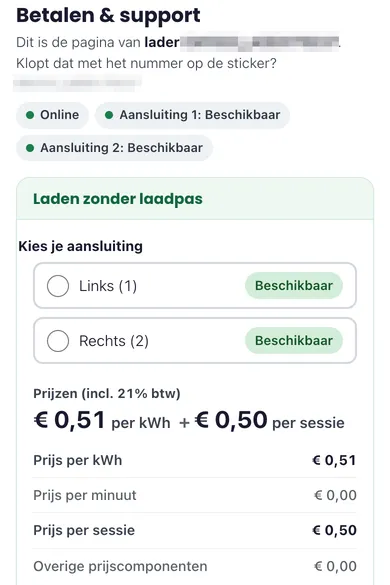
2. Choose and pay
If the charge point is open to visitors, you can pay without a charge card, by credit card, Apple Pay or Google Pay. With an accepted charge card, you start charging at the charger.
Step 2 shows the real page of a charger at the Crailo charging hub: the price per kWh the driver pays, plus a €0.50 start fee per session when paying by card. Step 1 is an example screen.
How does payment work?
The driver chooses Charge without a charge card and then the socket. Prices are shown including VAT before payment. The secure payment page reserves an amount on the card and starts the charging session on that charge point as soon as the car is plugged in.
After charging, only the charging costs are taken from the card. The driver’s bank decides when the rest of the reserved amount is released. If charging does not start, it costs nothing. The full process is in How do I start a charging session?
What does the driver pay, and what do you receive?
The driver only pays these amounts at charge points where the relevant payment method is switched on.
| With a charge card from another provider | Via the QR code | |
|---|---|---|
| Rate per kWh | Your rate | Your rate |
| Added per kWh | 5 ct | 5 ct |
| What the driver sees | One price per kWh: your rate plus 5 ct | One price per kWh: your rate plus 5 ct, and a start fee of €0.50 per session, incl. VAT |
| How the driver pays | Through the charge card provider | Directly, by credit card, Apple Pay or Google Pay |
| What you receive | Your rate per kWh, via your credit note | Your rate per kWh, via your credit note |
The only difference is the start fee, which is only added when paying via the QR code. The extra 5 ct per kWh applies in both cases. Card payments cost you nothing. Read how to set the rate per kWh.
You receive one credit note per charging month. Charge card providers settle with us afterwards. Your revenue is usually in your account within two months after the end of the charging month. Read more about payouts and your credit note.
Does AFIR require it?
If your charger is publicly accessible, for example because visitors, customers or guests charge there, drivers must be able to charge without a subscription and see the price in advance. Below 50 kW, this can be done with a QR code that leads to a secure payment page. If only your own employees charge there, these requirements do not apply. Read our explanation of AFIR.
What should you ask a back office?
Not every QR code works the same way:
| Question | Why it matters | At WIM |
|---|---|---|
| Does the payment page start the charging session itself? | A separate payment link does not tie the payment to the charging session. | Yes |
| Do you settle on the kWh charged? | The driver pays for the energy they actually used. | Yes |
| Are all parts of the price shown in advance? | AFIR requires the price to be shown before charging. | Yes, kWh rate and start fee |
| Do drivers need an app or account? | Charging without a subscription must be possible without registering. | No |
| What does it cost the owner? | Ask about costs per session, per month or as a percentage. | Nothing: the driver pays the start fee |
Can I choose per charge point?
Yes. Charge cards from other providers and card payment via QR are switched on per charge point, on request, at no extra cost. You decide which charge points are open and which are kept for your own employees only. Fast chargers of 50 kW and above have stricter payment requirements, which we discuss in the intake.
How to set it up
If you already have WIM Management, email info@wim.energy to tell us which charge points should be open and which rate you want. Not a customer yet? See Open your chargers to visitors and our pricing.
You can only sign up online for WIM Management AC at a single address. For DC, load balancing or several addresses, request an intake via the contact form.
By WIM Energy B.V. · Updated